

PointerCam vs Loom
A Loom alternative that zooms in on every click.
Loom is made for quick video messages that people watch from a link. When the video has to look finished, PointerCam places close-ups on your clicks, keeps the file on your computer, and makes a step-by-step guide from the same recording.
Choose Loom if
- You send quick updates that people watch from a link, with comments and emoji reactions.
- You want to see who watched, with Loom’s viewer insights.
- Your team keeps a shared video library, with Slack, Jira and Confluence built in.
- You record meetings, or you need apps for Windows, iOS or Android.
Choose PointerCam if
- You want the video to zoom in on what you click, with no editing.
- You’re new to editing video. The editor opens in Simple, with the close-ups already placed and the video ready to export.
- You want more on the free plan: 10-minute videos at up to 1080p, as many as you like.
- You want the video as a file. Loom lists downloads on its Business plan.
- You also need a written step-by-step guide from the same recording.
- You’d rather have no account and no upload.
Side by side
PointerCam and Loom, row by row.
Price, the free plan, where each records, and what you get from one recording.
Loom’s side is from loom.com/pricing, loom.com/download on 15 October 2026. PointerCam’s is from our pricing.
Close-ups placed for you
PointerCam samples your pointer 120 times a second while you record. When you stop, the video opens with a close-up on each click, arriving just before you press, and every click marked. Retune any of them, or export it as it is.
Loom’s pricing page lists click highlights and a drawing tool on its Business plan, and no zoom that follows your clicks.
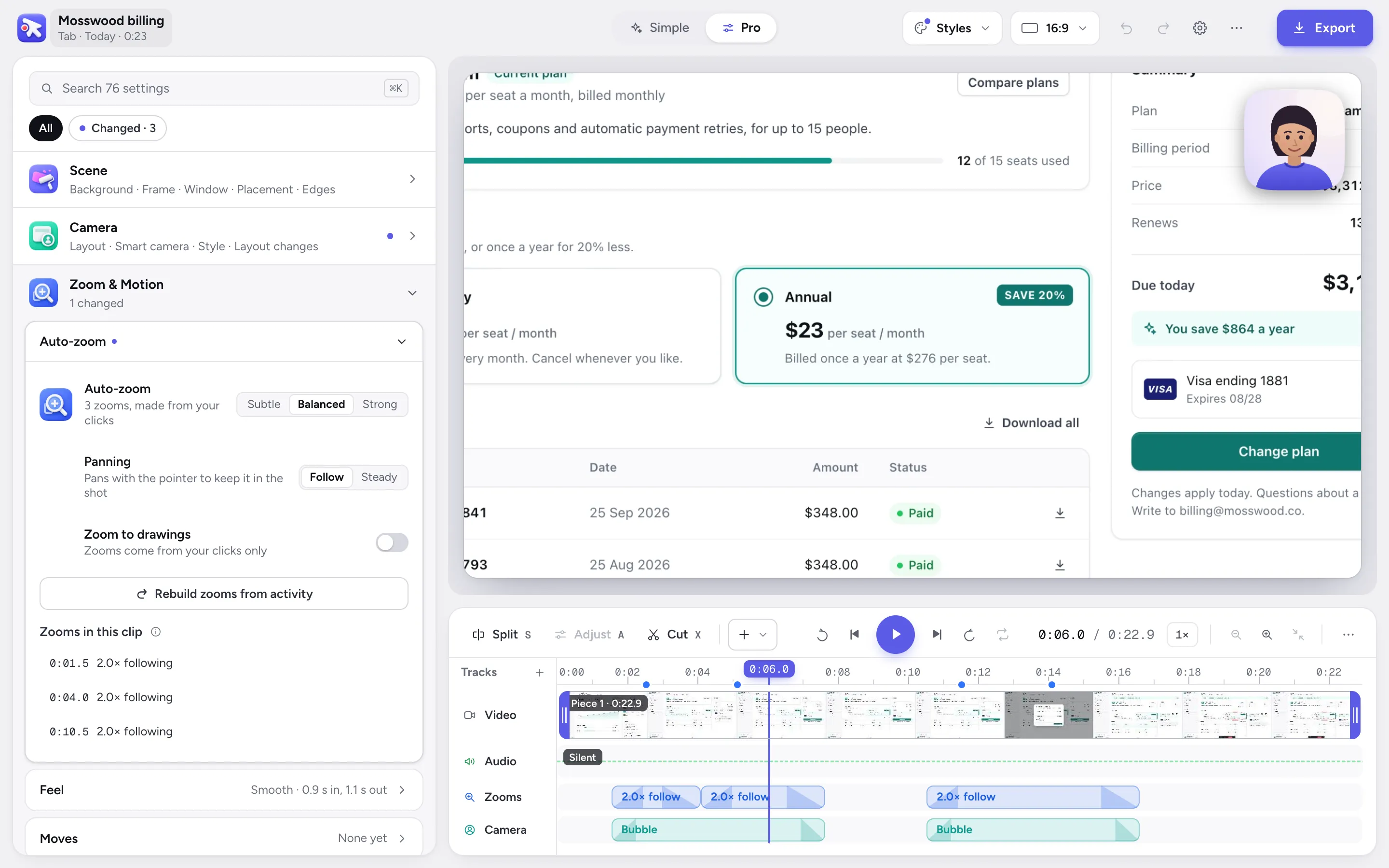
The video editor, with the close-ups it placed on each click.
A file you keep
A Loom is a link: the video is uploaded to Loom. Its free Starter plan allows 25 videos of up to 5 minutes at up to 720p, and downloading is listed on Business.
PointerCam records, edits and exports on your computer. You get an MP4, WebM or GIF to send, attach or post to YouTube, and there is no PointerCam server that could receive it. That also means PointerCam has no share link, comments or view counts.
An editor made for your first video
PointerCam opens a recording already finished: close-ups on your clicks, every click marked, ready to export. The editor starts in Simple, which shows what was done and the choices most videos make, one row each, like zoom strength, captions or the background.
The first time you open it, a short tour points out each part. When you want more, Pro lays out every setting, and ⌘K finds any of them by what it changes or by a problem you type, like “silence”.
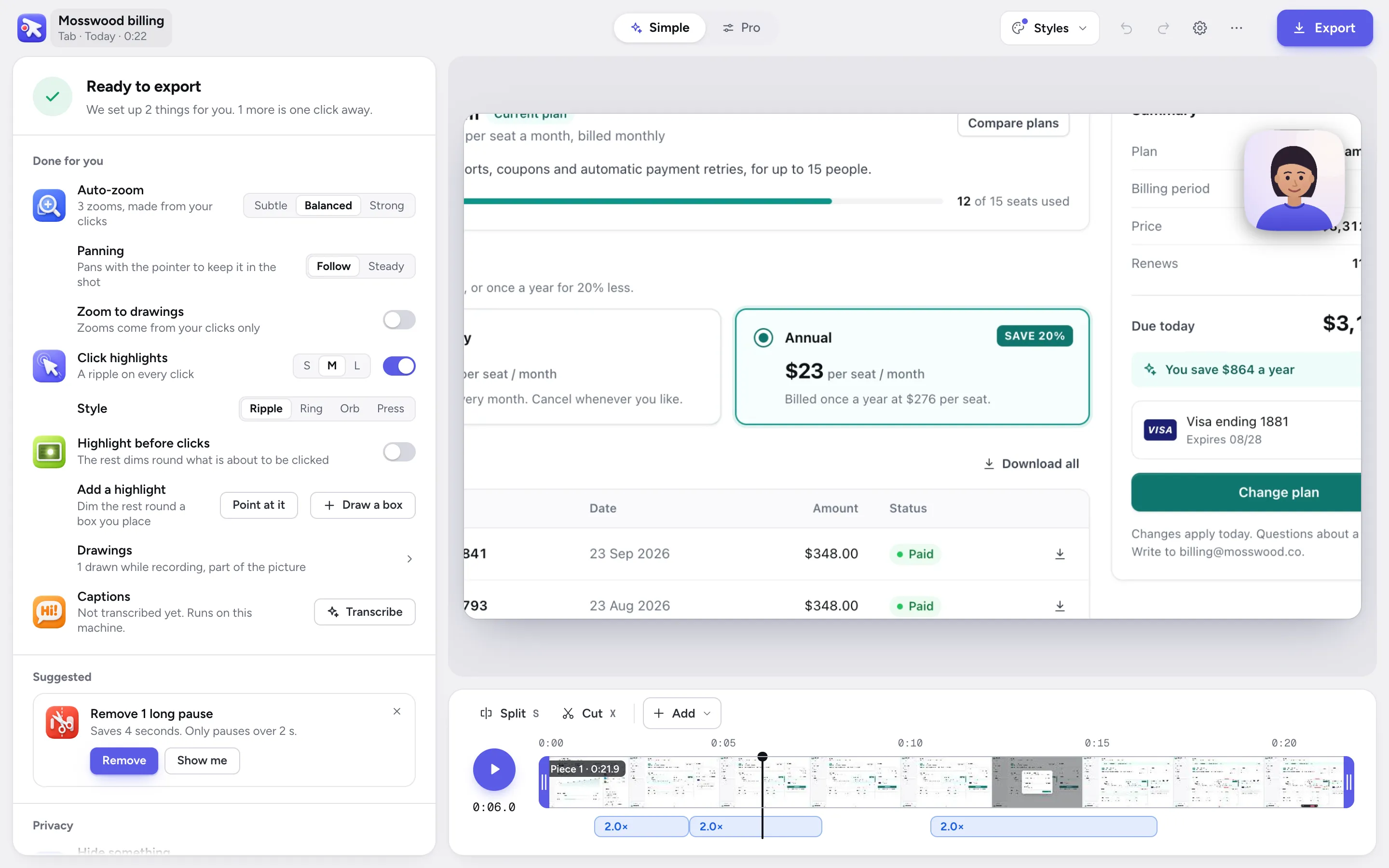
The video editor in Simple.
A guide from the same recording
Each click is also a numbered step in a guide, with a close-up of the screen and a line that says what you clicked. Export it as PDF, Word, a web page or Markdown, on the free plan.
Loom AI can turn a video into a document on its Business + AI plan, at $24 a person a month.
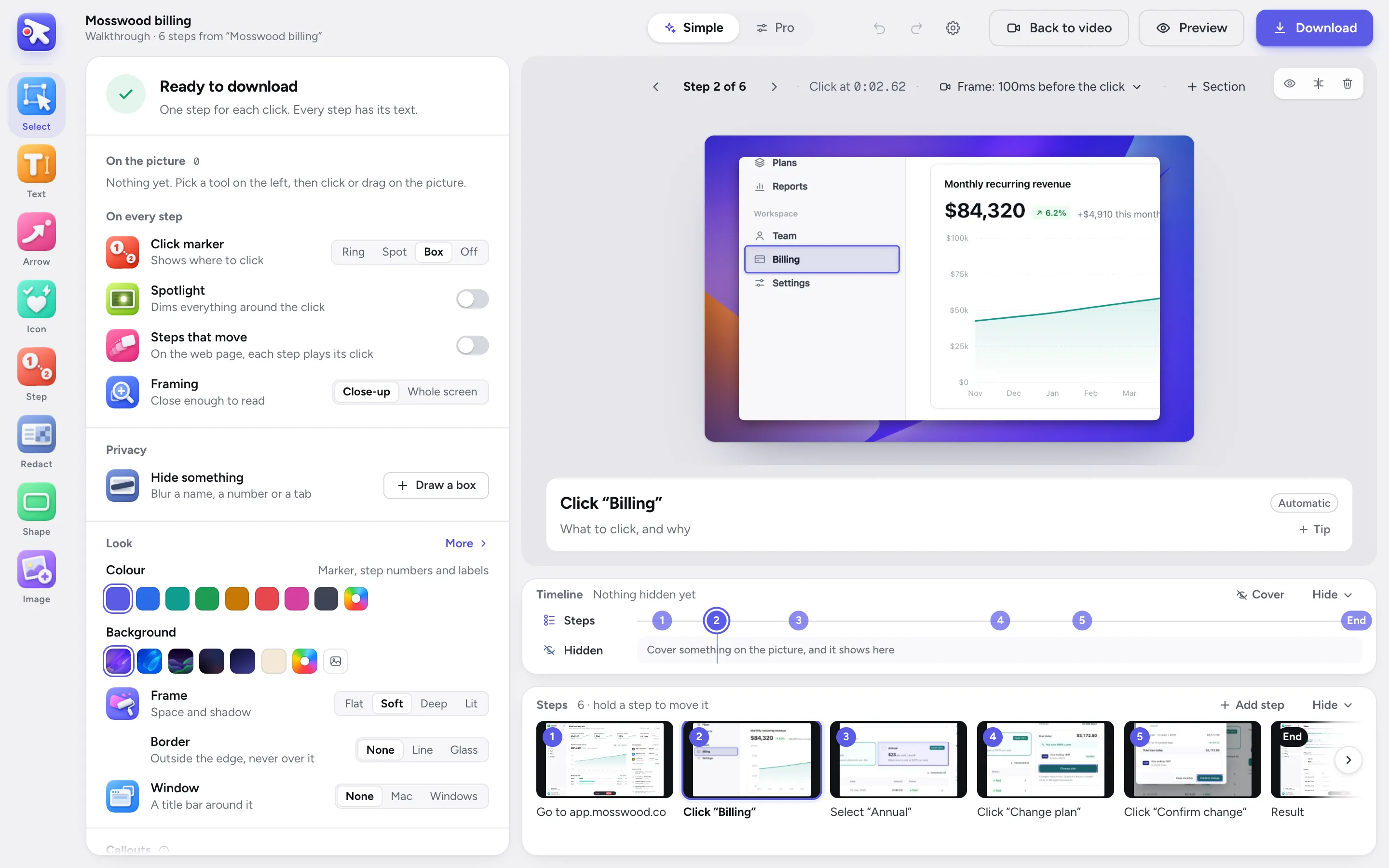
The guide editor, opened on the same recording as the video.
Where Loom is the better pick
For talking to a team, Loom does things PointerCam does not try to: a link that plays at once, comments and emoji reactions, viewer insights, a shared team library, meeting recordings, and apps for Windows, iOS and Android.
If your video is a quick message, use Loom. If it is a demo, a tutorial or a guide that has to look finished, try PointerCam.
Questions
 Questions
What people ask.
No. PointerCam makes files: the video as MP4, WebM or GIF, and the guide as PDF, Word, a web page or Markdown. Send them, attach them, or upload them where your viewers are. The guide’s web page is a folder you can put on any site.
More comparisons
No more plain screen recordings.
Make your next demo, tutorial or client update with PointerCam. It is free to try, needs no account, and nothing leaves your computer.
Only about PointerCam, and every email has an unsubscribe link. Privacy
Free to try · No account · Nothing uploadedOpen the web editor